
Most parents pick FamilyAlbum for the same reason. It was the first family photo app they heard of. For plain photo sharing, it works.
The friction shows up later. Your free photos are compressed. Grandma has to pay to press a heart. The full plan is $109 a year. The app looks the way it looked in 2019.
The bigger problem is privacy, and it is the part almost nobody checks until it matters. Most family album apps are thin here, and FamilyAlbum is no exception.
- No screenshot protection. Anyone you invite can screenshot any photo in your album. There is no setting to stop them, and no record that it ever happened.
- Ads, paid for with your data. The free tier runs advertising, and the data that makes advertising work is shared with ad networks. Your family becomes the product.
- Your photos leave for outside companies. They are sent to Google Cloud and run through facial recognition models. FamilyAlbum also works with Anthropic, the AI company behind Claude. And nothing in the privacy policy promises your children's photos will never be licensed for AI training.
If any of that bothers you, this is the point to start looking elsewhere.
Here is what to look for in a FamilyAlbum alternative, and how TinyNest compares.
Why parents leave FamilyAlbum #
1. The free tier compresses your photos #
This is the one that hurts most, because you find out years later.
FamilyAlbum shrinks your photos on the free plan to save storage. The photo of your baby's first smile is stored at lower quality than the one you took. It looks fine on a phone screen. It falls apart when you print it.
Plenty of parents clear their camera roll after uploading, thinking everything is safe. Then they order a photo book for a first birthday and see the difference. By then the originals are gone.
If you are on the free tier, never delete your local copies.
2. Basic things cost extra #
Some of what sits behind the paywall is hard to justify.
- Sticker reactions. Reacting with stickers needs a sticker subscription, at $3.99 a month for each person. Plain comments are free.
- Background upload. On the free plan you have to keep the app open while photos upload. Close it and the upload stops.
- More than one child. Real support for a second kid needs a paid plan.

3. It is the most expensive app in the category #
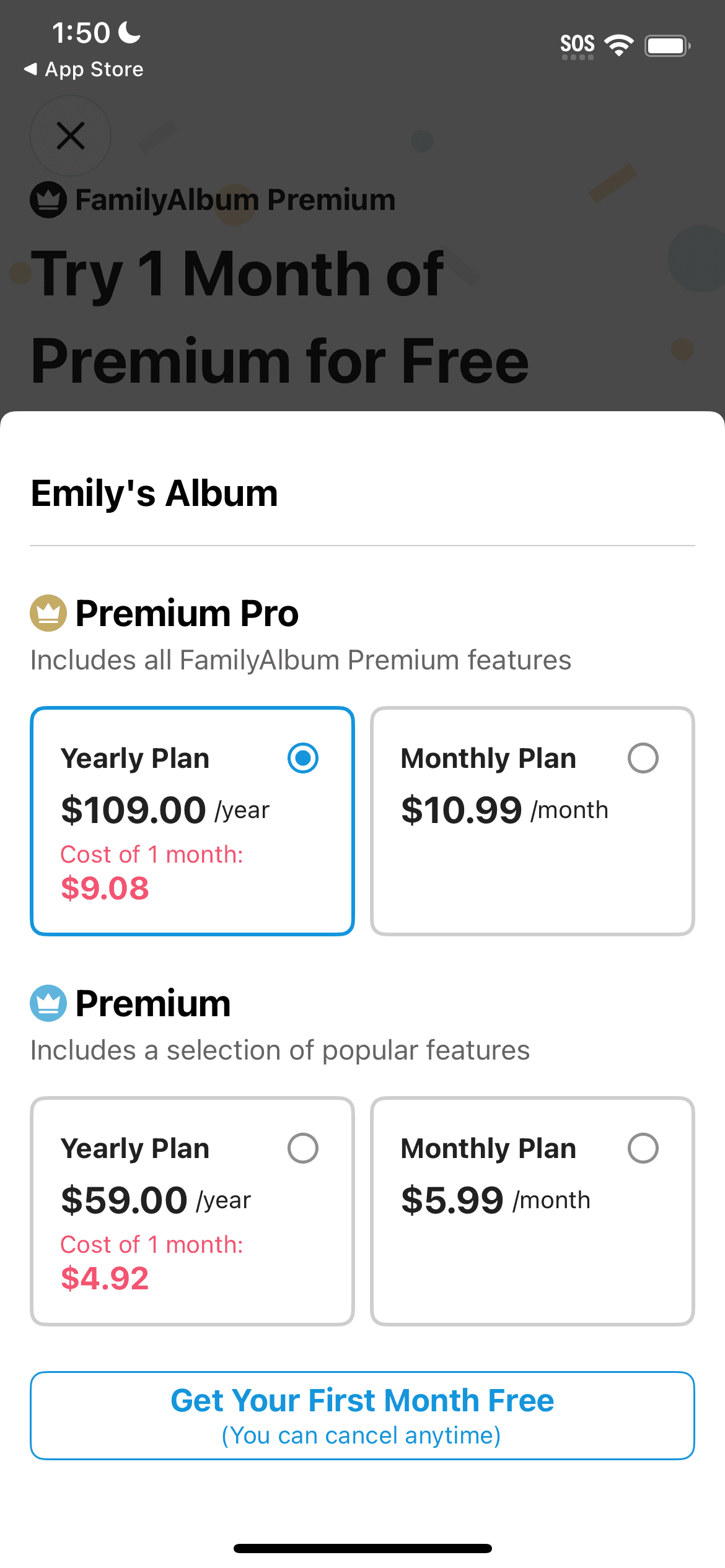
FamilyAlbum Premium Pro is $109 a year. We went through the tiers in our FamilyAlbum app review, and that is the highest price of any app we compared. The $59 plan exists, but it leaves out enough that we would not recommend it.
4. Photos only sort by month #
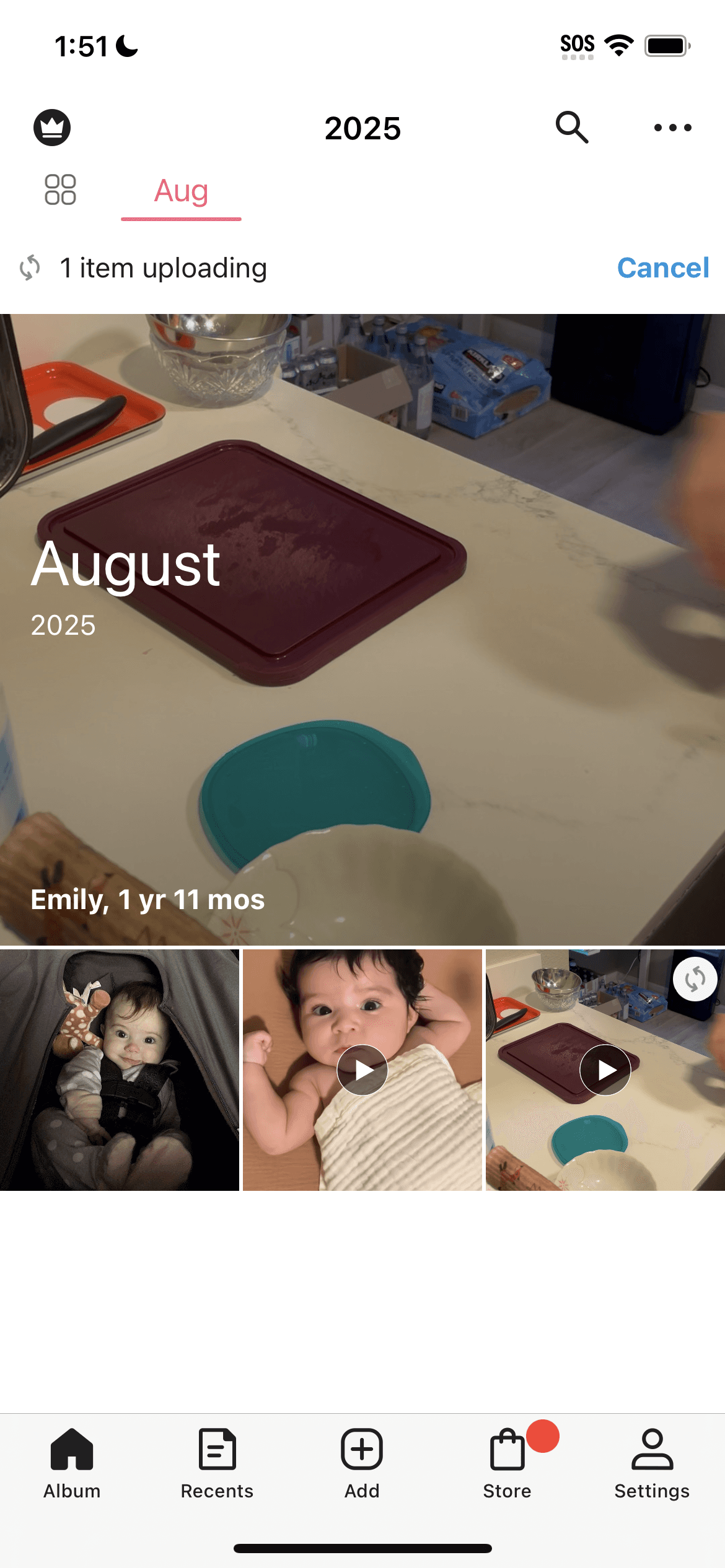
FamilyAlbum gives you a grid, grouped by month. That is the whole organizing system.
There are no events. No collections. No way to see your baby at a given age. Finding the week she started crawling means scrolling and guessing.
5. Development has been quiet since 2019 #
The last real feature was the one second video, and that shipped in 2019. For $109 a year you would expect the app to keep growing. Instead you are paying a premium price for storage. It is part of why FamilyAlbum did not take the top spot in our best family album apps roundup.
6. Anyone you invited can screenshot anything #
Think about who is actually in your album. Your sister. Your partner's mother. The friend you added right after the baby shower.
Every one of them can screenshot every photo. FamilyAlbum has no setting to stop it and no record that it happened. The photo leaves your album, lands in someone else's camera roll, syncs to their laptop, and travels on from there.
Almost nobody does this maliciously. A proud aunt reshares a birth announcement to her public Instagram story. That announcement carries a full name, a birth date, and a hospital. Now it is somewhere you cannot reach.
We wrote about why screenshots matter more than they sound like they do. It is the gap we hear about most from parents who switch.
What a good FamilyAlbum alternative needs #
Based on what parents tell us they wanted and did not get:
- Original quality storage without an upgrade
- Free reactions and comments for everyone
- Organization that follows your child, not the calendar
- Real control over what each person can do, not just who gets in
- A price that does not climb every year
- No ads, including on the free tier
FamilyAlbum and TinyNest, side by side #
TinyNest was built by a parent who used FamilyAlbum, got tired of the same things, and built the app he wanted instead.
| FamilyAlbum | TinyNest | |
|---|---|---|
| Price | Free with ads, or $109/year | Free, or $79/year |
| Free tier photo quality | Compressed | Original |
| Screenshot control per member | No | Yes |
| Screenshot history | No | Yes |
| Sorted by your baby's age | No | Yes, automatically |
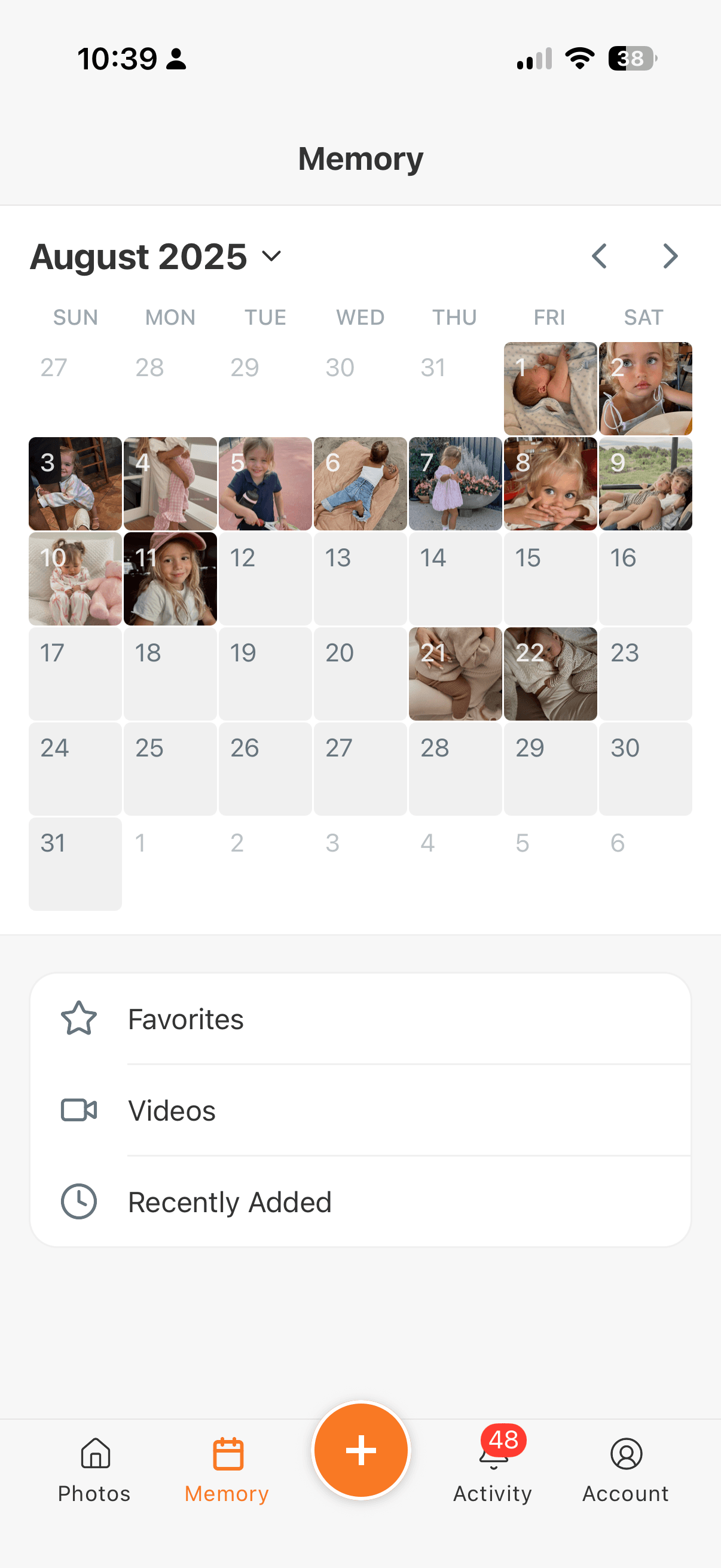
| Calendar view | No | Yes |
| More than one child | Paid only | Free |
| Sticker reactions | $3.99 a month per person | Free |
| Background upload | Paid only | Free |
| Ads | Yes, on the free tier | Never |
| Album size limit | 100 people | No limit |
| Photo prints and books | Yes | No |
Where TinyNest is different #
You decide who can screenshot #
This is the feature parents arrive for, and no other family album app offers it.
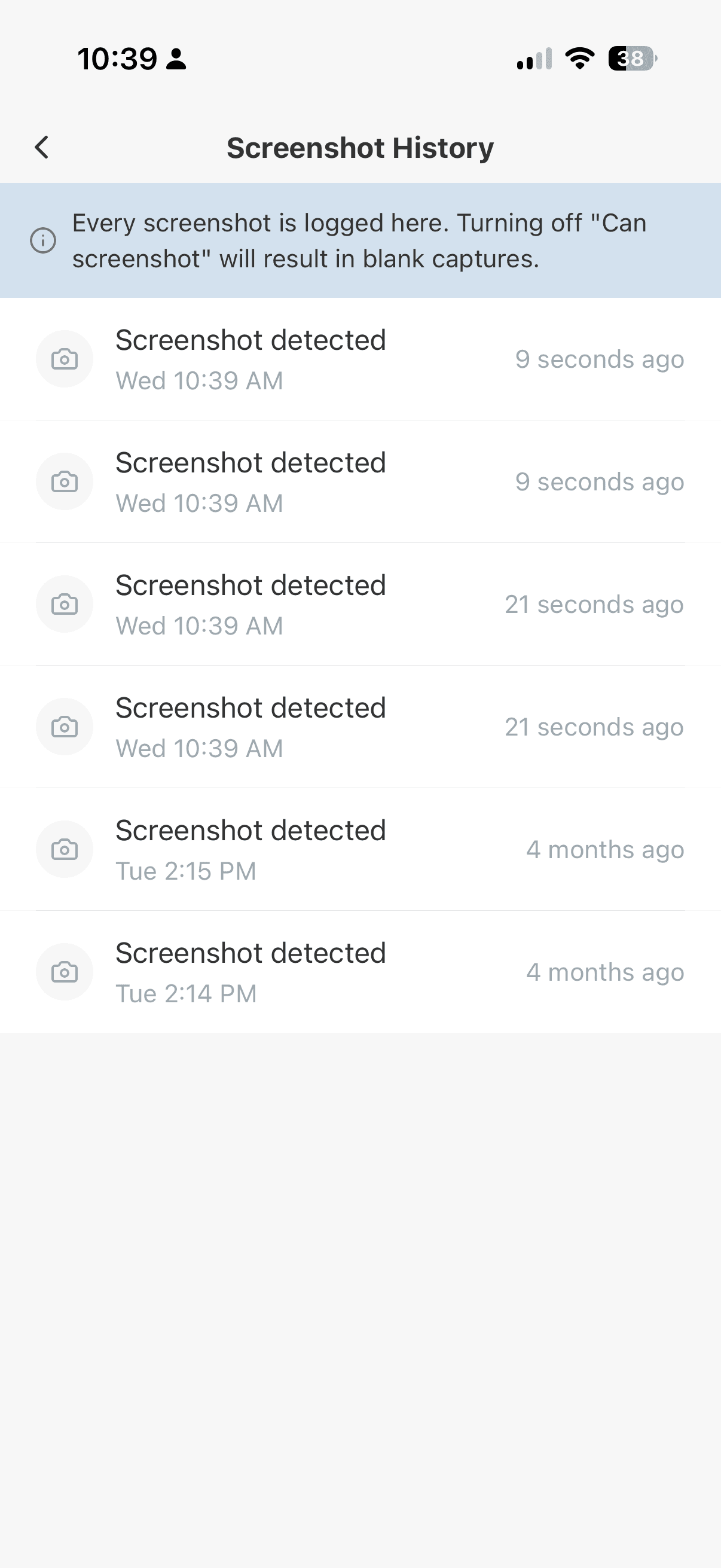
Every member of your album has their own permissions, and screenshot access is one of them. Let Grandma capture whatever she likes. Turn it off for the coworker you invited during the newborn fog.
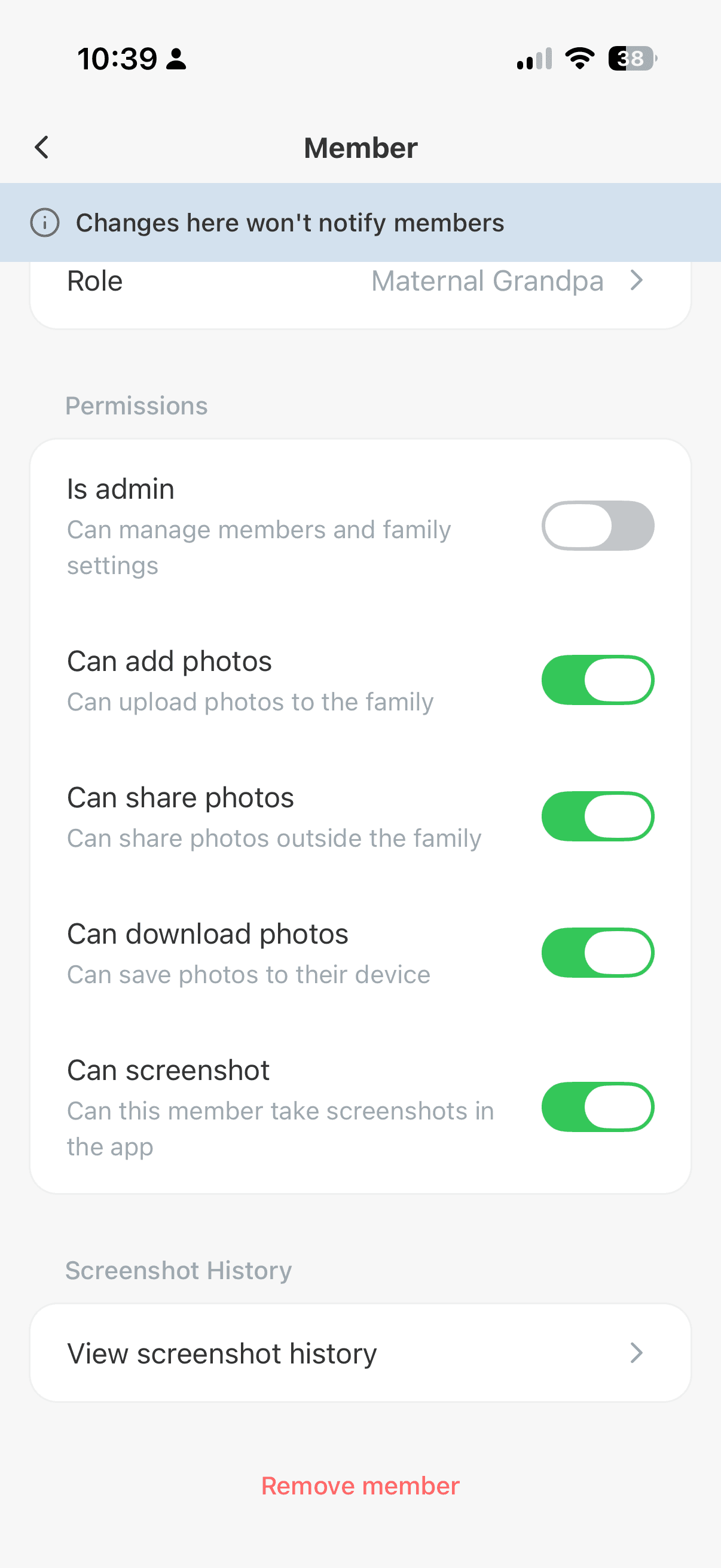
Two details make it work in practice.
Someone without permission can still press the buttons. They just get a blank image instead of your baby. That matters, because iOS does not let any app block the screenshot gesture. Any app claiming to block screenshots on iPhone either works this way or does not really work. TinyNest lets the capture happen and makes sure it captures nothing.
Changing the setting is also silent. Nobody gets a notification saying you restricted them. That saves a conversation you do not want to have.
Every screenshot gets logged either way, so you have a record of when a photo left.
Sorted by your baby's age, not the calendar #
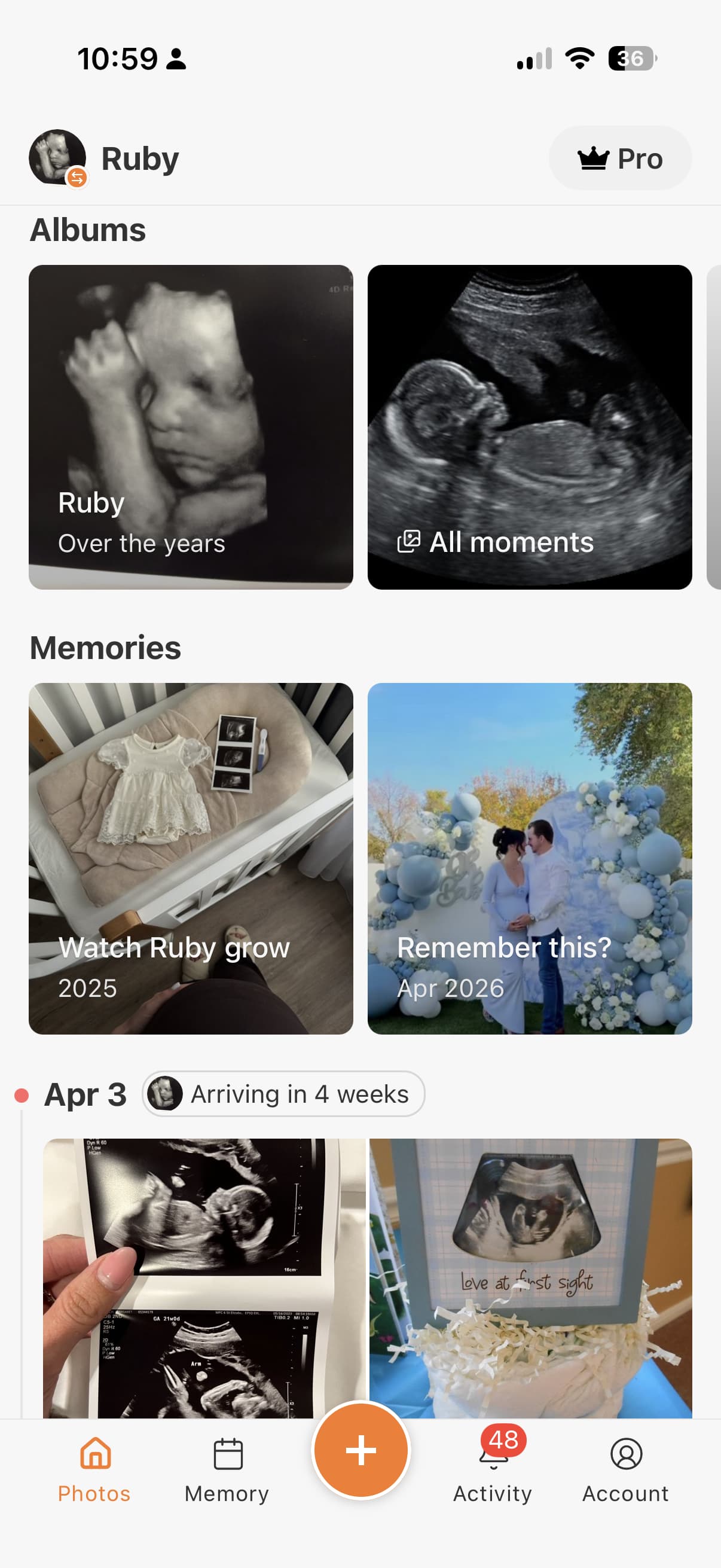
TinyNest files photos by how old your baby was, not by which month it happened to be. Three months. Six months. First birthday.
That matches how parents actually remember things. You do not think "was that March or April." You think "what did she look like at four months." The timeline starts at the first ultrasound and runs to today.
There is a calendar view for jumping to a specific date, and an "on this day" feature that surfaces photos you forgot you had.
Privacy that continues past the invitation #
On FamilyAlbum the invite is the whole privacy question. Once someone is in, they can do whatever they like with what they see. Download it, screenshot it, pass it on.
That is not how families work. A great aunt and a grandparent are not the same level of close. TinyNest gives every member their own permissions, so a great aunt can look without being able to download, reshare, or screenshot. There is no cap on how many people you invite.
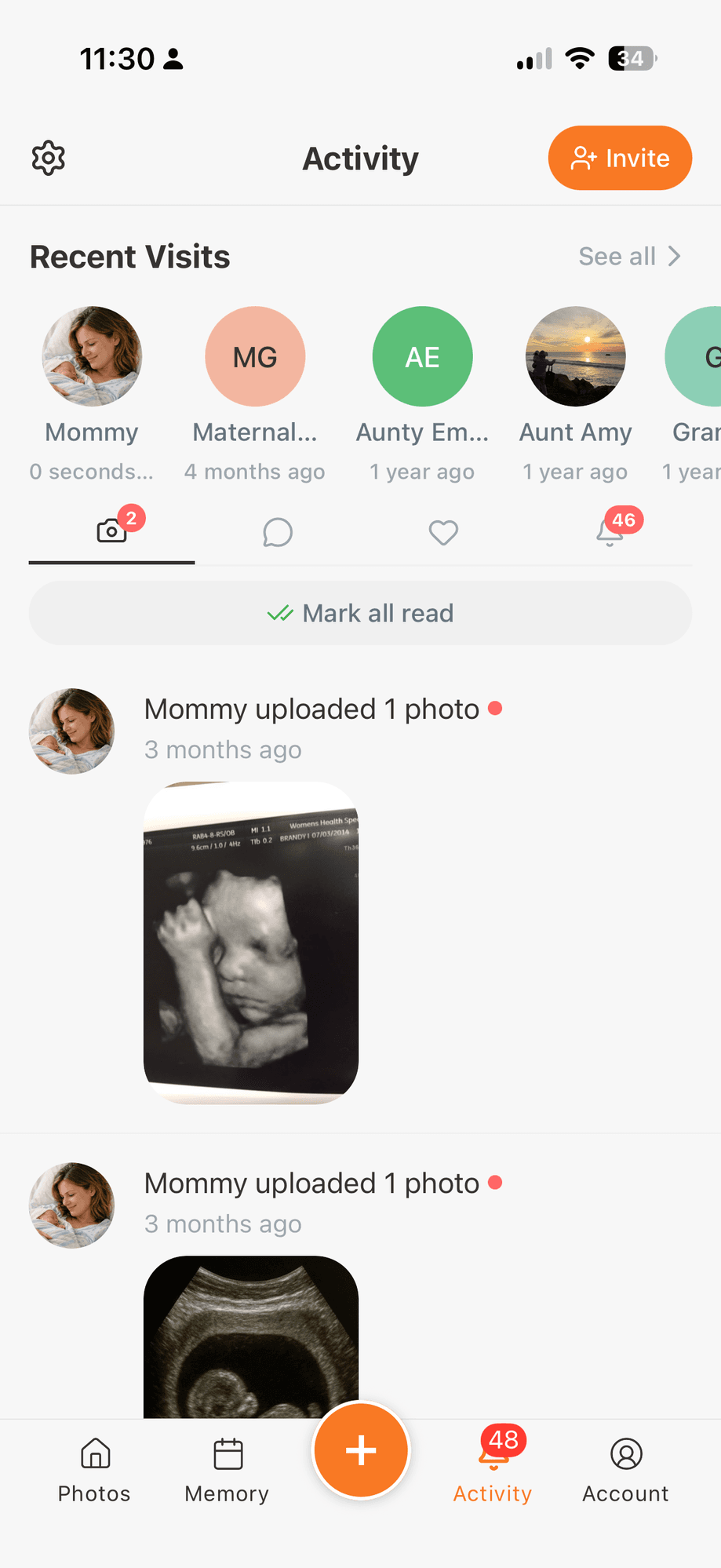
You can also see who has actually been looking. The activity screen lists recent visits, so you know the photos are reaching people rather than sitting there.
Nobody outside TinyNest touches your photos #
Your baby's photos are never sent to an outside company for processing. No facial recognition. No content scanning. No third party analysis of any kind.
That promise lives in our terms, not just on a marketing page. We will never sell or license your content, including photos and videos of your children, to AI companies, large technology companies, or anyone else for training AI or machine learning models. There are no ads in the app at all.
It is worth reading FamilyAlbum's privacy policy next to that. Your photos go to Google Cloud and are processed for facial feature recognition. FamilyAlbum also works with Anthropic, the company behind Claude. Their policy never promises your children's photos will not be licensed for AI training. It simply does not address it.
$79 a year, and a free tier you can actually live on #
TinyNest Pro is $79 a year against FamilyAlbum's $109.
The bigger difference is the free tier. Original quality photos, reactions, background upload, and support for more than one child are all included at no cost. On FamilyAlbum, three of those four require payment.
Where FamilyAlbum still wins #
Two honest points, because you should hear them before you move.
Prints. FamilyAlbum gives every album member 11 free prints a month and sells photobooks in the app. TinyNest sells nothing physical. You download your photos and print them wherever you like. Most parents we know already use Walgreens, CVS, or a printer at home, and you get to shop around. But if free monthly prints were the reason you signed up, that is a real thing to give up.
Track record. FamilyAlbum has been running for over a decade with a large user base, especially in Japan. TinyNest is newer. If longevity is what makes you comfortable, that is fair.
How to switch from FamilyAlbum to TinyNest #
- Download TinyNest from the App Store or Google Play
- Set up your baby's profile with a name and birthday
- Invite your family, and set what each person can do
- Start uploading, and watch the photos sort themselves by age
One tip. Do not delete FamilyAlbum right away. Keep it until your important photos are in TinyNest. And upload from your phone's original library rather than exporting from FamilyAlbum, because anything that went through their free tier is already compressed.
The bottom line #
FamilyAlbum was a good app when it launched. In 2026, $109 a year for compressed photos, paid reactions, and a design frozen in 2019 is a hard sell.
TinyNest costs less, keeps your photos at full quality, organizes them around your child, and is the only app in this category that lets you decide who can screenshot what. The free tier is generous enough that you can try all of it before paying anything.