
Let us start somewhere most comparisons will not. FamilyAlbum is a good app. It has more than 18 million users, a 4.9 rating from over 367,000 people on the US App Store, and a decade of history behind it. If someone tells you it is bad, they are selling you something.
TinyNest also sits at 4.9 stars. We have far fewer ratings, because we are far newer.
So the real question is not which app is broken. Neither is. It is which one fits your family, and that turns out to have a fairly clean answer.
The short answer #
If you live in Japan, use FamilyAlbum. That is its home market. It is built by Mixi, a Japanese company, it is the default there, and the family you would invite is probably already on it. The print products are built for that market too. Fighting the local default is not worth it.
Everywhere else, we would choose TinyNest. Original quality photos, control over what each family member can do with them, screenshot permissions that no other app in this category offers, and support for more than one child. All on the free tier. FamilyAlbum charges for most of that, and does not offer the rest at any price.
We are obviously not a neutral party here. So the rest of this post is the evidence, sourced from FamilyAlbum's own pricing page wherever we can.
Full comparison #
Everything in the FamilyAlbum column comes from their own pricing page, their help center, and their blog. We have linked sources where a claim is not obvious.
| FamilyAlbum | TinyNest | |
|---|---|---|
| App Store rating | 4.9 (367K ratings) | 4.9 (2.4K ratings) |
| Free tier photo quality | Compressed | Original |
| Free tier video length | 2 minutes | No cap |
| Highest video quality | 1920x1080, top tier only | Original |
| Storage | Unlimited | Unlimited |
| Ads | Yes, on the free tier | Never, on any tier |
| Paid tiers | $2.99, $5.99, or $10.99 a month | One plan |
| Yearly price | $59 or $109 | $79 |
| Per member screenshot control | Not available | Free |
| Screenshot history | Not available | Free |
| Background upload | Top tier only, iOS only | Free |
| Upload from a computer | Paid | Not available |
| Multiple children | Paid | Free |
| Sticker reactions | Sticker subscription, $3.99 a month per person | Free |
| Comments | Free | Free |
| Organized by | Month only | Month, your baby's age, and a calendar |
| Album size limit | 100 people | No limit |
| Recap videos | Every 3 months free, monthly if paid | Included |
| Photo prints and books | Yes, 11 free prints a month | Not available |
| Bulk download | Top tier only | Included |
| Photos processed by outside companies | Yes, Google Cloud | No |
| Promise never to license photos for AI training | Not in the policy | In the terms |
Price: it is more complicated than one number #
FamilyAlbum has three paid tiers, and this is where most parents get caught.
- Premium One, $2.99 a month. Covers you only, not your family.
- Premium Family, $5.99 a month or $59 a year.
- Premium Family Pro, $10.99 a month or $109 a year.
The tier names suggest the difference is size. It is not. The difference is which features you get, and several things most parents assume are basic sit at the top.
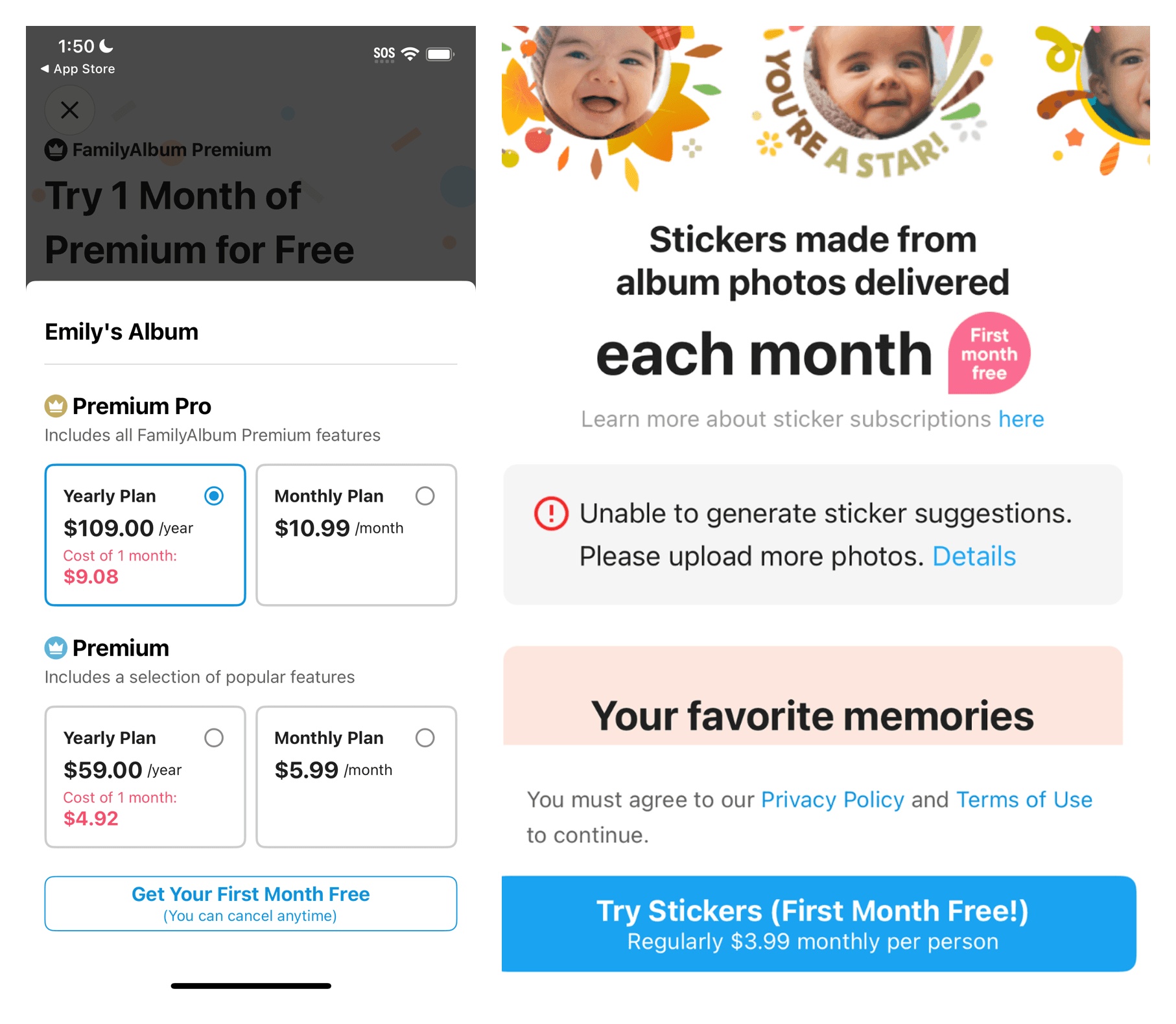
TinyNest has one paid plan at $79 a year. Everyone in your family is covered. There is no higher tier holding features back.
So the honest price comparison is not $79 against $109. It depends what you need. If the free tier covers you, FamilyAlbum is cheaper, because it is free. If you want the features most parents end up wanting, you are looking at $109 against $79.
What sits behind FamilyAlbum's paywall #
This is from their own pricing page, not from us.
Background upload is the top tier, and iOS only. At $109 a year. On anything cheaper you keep the app open and wait. Android users do not get it at all, at any price.
This is the one we would push back on hardest. Photos uploading while your phone is in your pocket is not a premium feature. It is the difference between an album that stays current and one you keep meaning to catch up on.
Video is capped at 2 minutes on the free plan. Ten minutes if you pay. A birthday party or a recital needs splitting.
Video quality is 720p unless you pay $109. Full 1920x1080 is Premium Family Pro only.
Per child pages, computer upload, bulk download, tags, and search by comment are all paid.
Sticker reactions need a separate subscription at $3.99 a month per person. Plain comments are free.
On TinyNest, sharing controls, background upload, original quality, multiple children, and reactions are all on the free tier.
Photo quality, and the part that catches people out #
FamilyAlbum compresses your photos on the free plan. This is the single thing we would want a new parent to understand before choosing.
It looks fine on a phone. It falls apart in print.
The pattern we hear repeatedly goes like this. A parent uploads everything, sees it safely in the app, and clears their camera roll to free up space. Two years later they order a first birthday photo book and the photos are soft. The originals are gone.
If you use FamilyAlbum's free tier, keep your local copies. Do not treat it as a backup.
TinyNest stores what you gave it, at original quality, on the free tier. Nothing is compressed to save us money.
Privacy, and the thing no other app does #
Every family album app asks who gets in. TinyNest is the only one that asks what they can do once they are in.
Every member has their own permissions. Can add photos. Can download. Can share outside the family. And can screenshot.
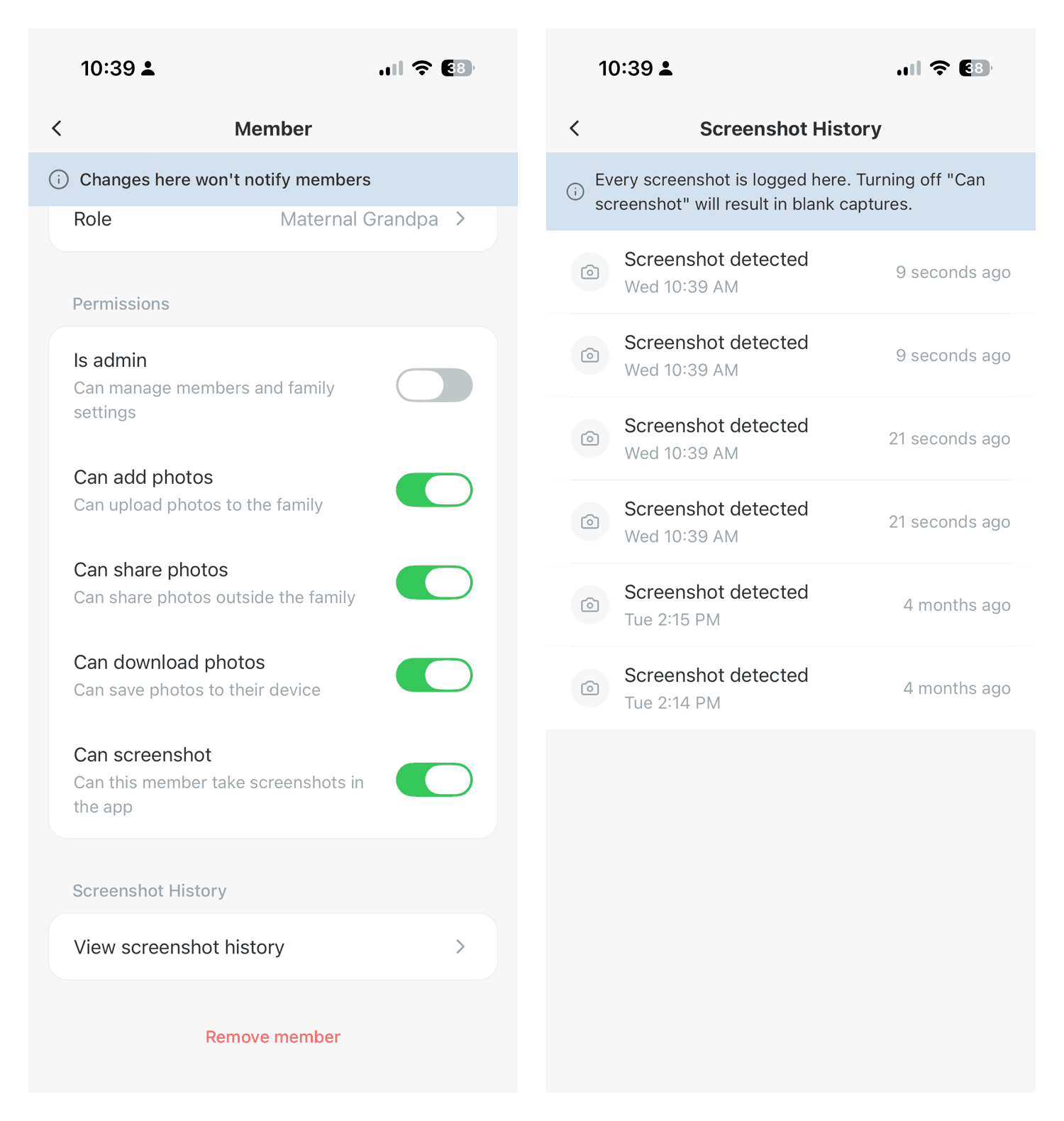
Turn screenshot off for someone and they get a blank image instead of your baby. That distinction matters, because iOS does not let any app block the screenshot gesture. Any app claiming to block screenshots on iPhone either works this way or does not really work.
Changing the setting is silent. Nobody is told you restricted them.
Every screenshot is logged either way, with a timestamp, so you have a record of when a photo left your album. We wrote a full walkthrough of how it works.
FamilyAlbum has none of this. No screenshot control, no blank captures, no history. Neither do Tinybeans, 23snaps, Google Photos, or iCloud Shared Albums.
Where your photos actually go #
FamilyAlbum sends your photos to Google Cloud, where they are processed for facial feature recognition. FamilyAlbum also works with Anthropic, the AI company behind Claude. Their privacy policy never promises your children's photos will not be sold or licensed for AI training. It does not address the question.
TinyNest does not send your photos to an outside company for processing. No facial recognition. No content scanning. No third party analysis. And our terms state that we will never sell or license your content, including photos and videos of your children, to AI companies, large technology companies, or anyone else for training AI or machine learning models.
That is in the agreement, not on a marketing page.
Organization: months versus your child #
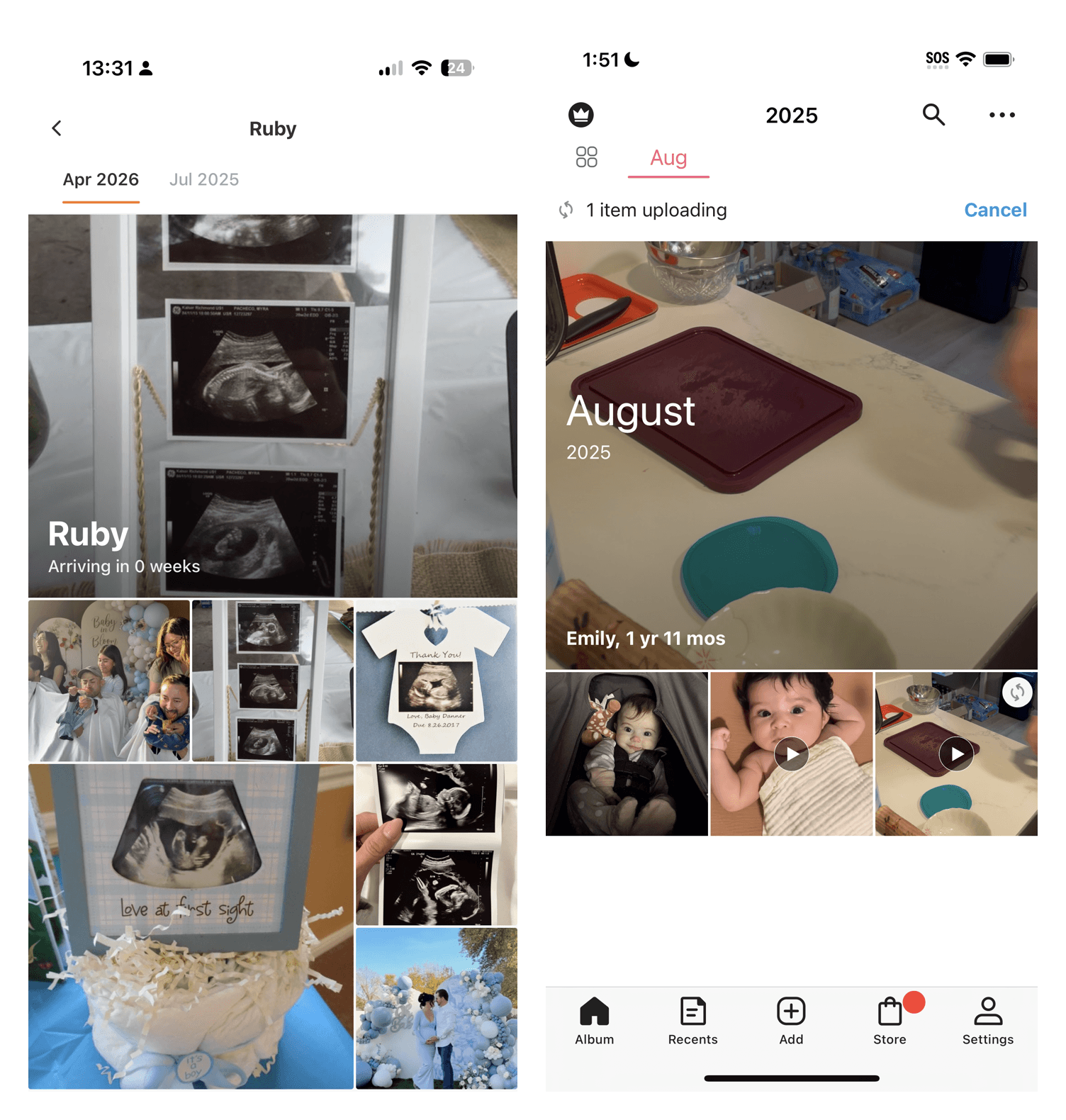
Both apps group photos by month, and both put your child's age on the month header. The screenshots near the top of this post show that much. The difference is what happens after that.
FamilyAlbum stops there. The age is a label, not something you can navigate by. There are no events, no collections, and no way to jump to a particular age.
TinyNest treats the age as the spine. A timeline starts at your first ultrasound and runs to today. An "on this day" feature resurfaces things you forgot. And there is a calendar view, which FamilyAlbum has no equivalent for, showing you exactly which days have photos and which ones you missed.
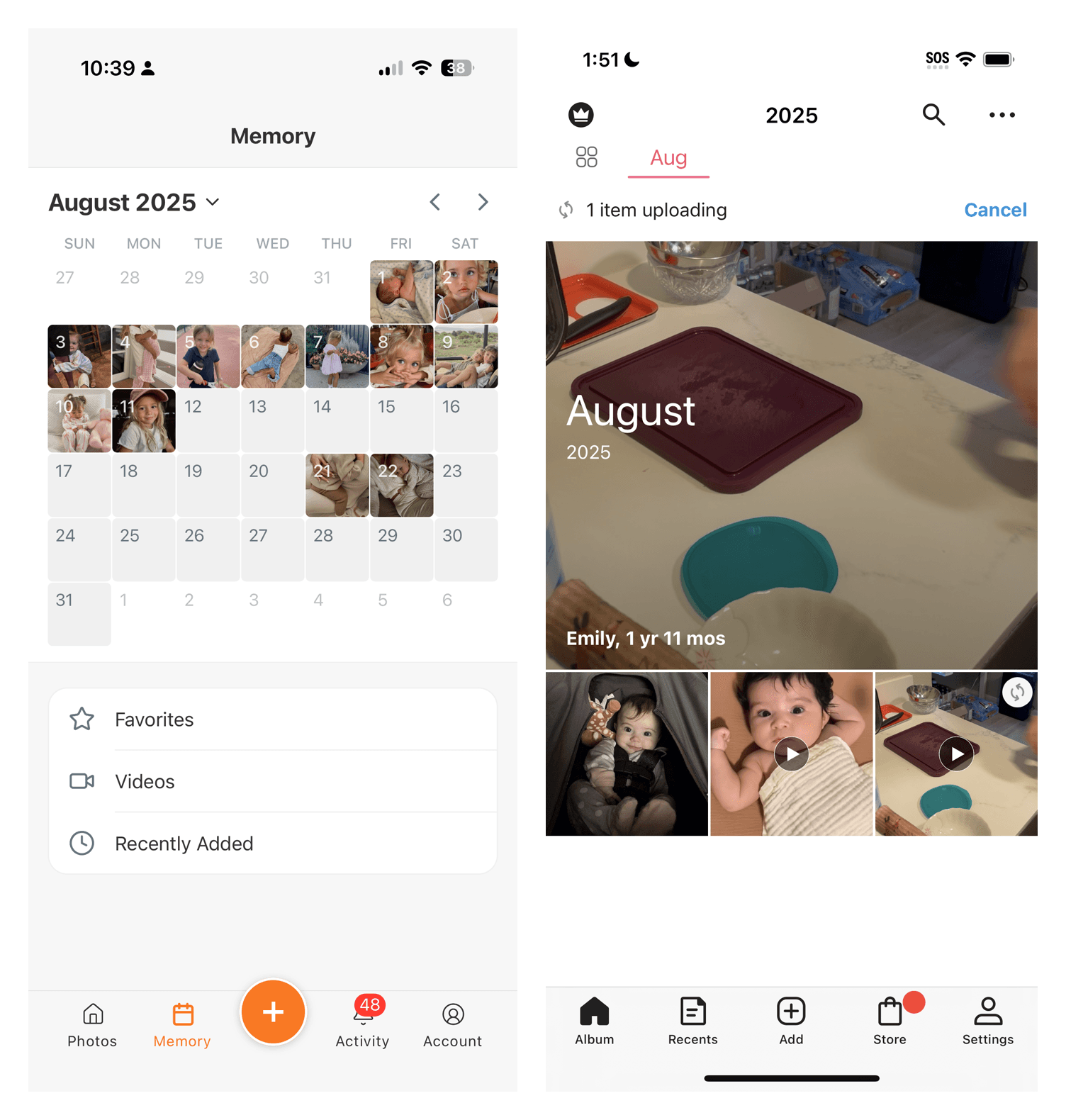
The difference shows up when you go looking for something. You do not remember that the first crawl was in March. You remember she was about seven months old.
When FamilyAlbum is the better call #
You live in Japan. This is the real one. FamilyAlbum is built by Mixi, a Japanese company, and Japan is its home market. It is the default there. That means the relatives you would invite are probably already using it, the print and photobook products are set up for that market, and the whole app is tuned for it. An album your family actually opens beats a better app your family never joins. If you are in Japan, stay where your family already is.
You want the free prints more than anything else. Every album member gets 11 free prints a month, plus photobooks in the app. TinyNest sells nothing physical. You download and print wherever you like. For some families those prints outweigh everything else on this page.
You upload from a computer. FamilyAlbum allows it on paid plans. TinyNest is phone only today.
Where TinyNest wins #
Per member control, including screenshots, which nothing else in this category offers.
Original quality on the free tier, with no compression to save us money.
One plan. No tier maze, and no feature you discover is locked after you have already committed years of photos.
It is still being built. TinyNest shipped an update the day before this post went up. FamilyAlbum's last significant feature was the one second video, in 2019.
Privacy in writing. No ads on any tier, and a written promise about AI training.
So which one should you choose? #
You live in Japan. FamilyAlbum. Go where your family already is.
You want free monthly prints above all else. FamilyAlbum.
Everything else. TinyNest. To be specific about what that covers:
- You care who can screenshot your child's photos. Nothing else in this category offers it.
- You have more than one child. Free on TinyNest, $59 a year on FamilyAlbum.
- You want to stop a specific relative downloading or resharing your photos. Per member permissions are free on TinyNest and do not exist on FamilyAlbum.
- You want original quality without paying. Free on TinyNest, $109 a year on FamilyAlbum.
- You use Android and want background upload. TinyNest has it free. FamilyAlbum does not offer it on Android at any price.
- You want the cheapest full featured plan. $79 against $109.
The bottom line #
FamilyAlbum earned its 4.9 rating, and in Japan it is the sensible default. That is its home market, your family is probably already there, and network effects beat feature lists every time.
Outside Japan the case gets much harder to make. The things most parents end up wanting, which is keeping photos at original quality, adding a second child, and uploading in the background, are all either paid or unavailable. And the two questions that matter most, who can screenshot your child's photos and whether their face is being processed by an outside company, FamilyAlbum either charges for or does not answer at all.
That gap is the reason TinyNest exists. For most families, it is the one we would pick.
Still weighing other options? We compared seven family album apps, and if you are specifically looking to leave FamilyAlbum, we wrote about the best alternatives. There is also our full FamilyAlbum review.